Shoppers now ask ChatGPT where to buy. I checked 225 large online stores and found a problem that never shows up in Google Analytics, in Search Console or in your sales reports.

When a shopper asks ChatGPT "where can I buy this?", ChatGPT goes and looks. If it can't get into your store, you're not in the answer.
No error, no alert, no drop you can see. Just a sale that went to someone else.
What did I see?
About 1 in 10 large stores block the AI bots that bring shoppers. I tested 225 stores the way ChatGPT and Perplexity reach them, then asked ChatGPT itself to shop in the ones that failed.
225 big stores. 18 hide from AI shoppers.
- 225 large WooCommerce stores tested
- 188 open normally for Google
- 86 block at least one AI bot
- 18 block the bots that bring shoppers

Here is the sample, so you can judge the numbers:
- 225 Israeli online stores on WooCommerce, each with more than 1,000 products, all behind Cloudflare
- 188 of them opened normally for Google. The other 37 I set aside, because I couldn't reach them reliably from my test machine
- I visited each live store as five different AI bots: two that collect training data and three that bring shoppers
The result:
- 86 of the 188 (46%) block at least one AI bot
- 18 of the 188 (9.6%) block at least one of the bots that bring shoppers: ChatGPT search, ChatGPT browsing or Perplexity
- Then I asked ChatGPT itself to find a product, with a price and a link, in 16 of those 18 stores. In 10 of them it got an error and saw no products at all
Share of live stores blocking each AI bot

What do I think it means?
I think most of these stores never chose to block ChatGPT. A security layer did it for them. That's my reading of the data, and here is what it rests on.

On 6 November I re-tested the 18 stores and looked at where each block came from:
- 11 were blocked by the store's own web server. The error page came from the server software (nginx or LiteSpeed), not from Cloudflare. That usually points to the hosting company's firewall or a security plugin on the site
- 4 were blocked by Cloudflare itself, with Cloudflare's own block page
- 3 had opened up again since my first scan
Where the 18 blocks happened
- 🤖ChatGPT or Perplexity looks for a product
- ☁️Cloudflare4 stores stopped here
- 🖥️The store's own server (hosting firewall or security plugin)11 stores stopped here
- 🛍️Your products3 stores have opened up since the first scan
Nobody writes "block ChatGPT" in a business plan. It happens when a security tool is set to stop "bots" in general, and an AI shopping assistant looks like a bot.
I didn't ask each store. If you run one of them and you blocked these bots on purpose, that's a legitimate choice. The point of this post is that it should be a choice.
Why should you care?
Because AI answers are becoming a free shop window, and a blocked store isn't in it. The shift is already large:
- Google says its AI Overviews reach more than 2.5 billion people a month, and AI Mode more than a billion
- OpenAI says plainly what happens if you block its search bot:
"Sites that are opted out of OAI-SearchBot will not be shown in ChatGPT search answers, though can still appear as navigational links." (OpenAI, Overview of OpenAI Crawlers)
- Perplexity says its search bot is there "to surface and link websites in search results" and is not used to train AI models
Same question, two different stores
ChatGPT can read the store
ChatGPT gets an error
So the cost of a block is not abstract. It's the shoppers who asked an AI assistant and were sent to a competitor that let the assistant in.

And you won't see it in your reports. Google Analytics only counts visitors who load the page, and a blocked bot never does. Search Console only reports on Google. Your sales report shows the orders you got, not the ones that went elsewhere.
Is blocking AI always a mistake?
No. Blocking the bots that train AI models is a fair choice. Blocking the bots that bring buyers is the expensive one. The two kinds do different jobs.

- Training bots (GPTBot, ClaudeBot) collect content to train future models. Blocking them keeps your text out of training data. It doesn't stop ChatGPT or Claude from finding and linking your store when a shopper asks
- Search and shopping bots (OAI-SearchBot, ChatGPT-User, PerplexityBot) fetch your pages to answer a real person's question right now, with a link to you
Two kinds of AI bots
My own site blocks the training bots and lets the search bots in. Cloudflare set that up for me, and I kept it:
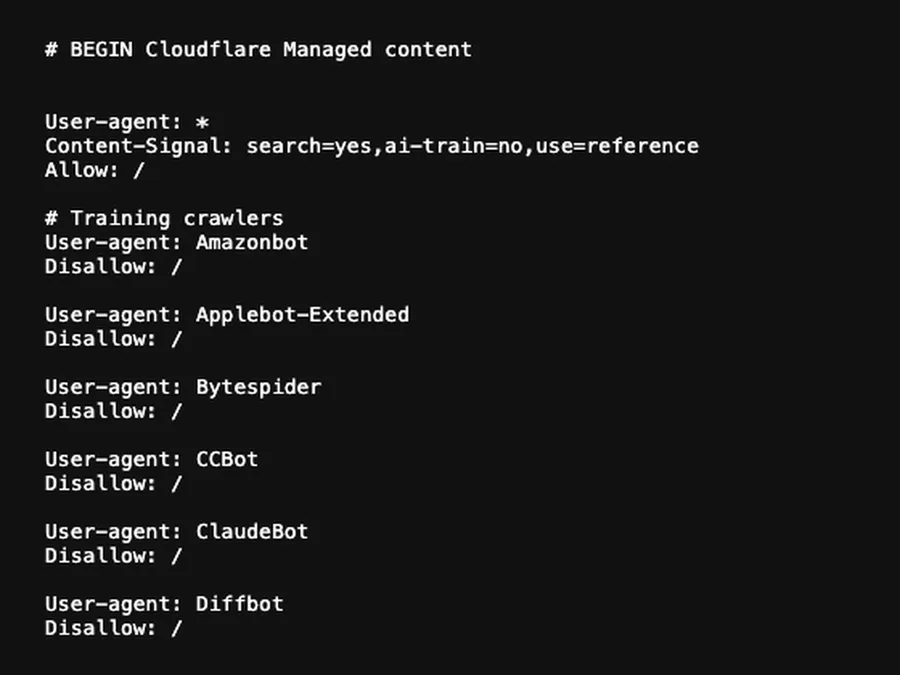
Which bots bring buyers?
Three bots matter most for a store: OAI-SearchBot, ChatGPT-User and PerplexityBot. This table shows who runs each bot, what it does, and what blocking it costs you:
| Bot | Company | What it does | If you block it |
|---|---|---|---|
| OAI-SearchBot | OpenAI | Finds sites for ChatGPT search | You don't appear in ChatGPT search answers |
| ChatGPT-User | OpenAI | Opens your page when a user asks ChatGPT to | ChatGPT can't check your products or prices |
| PerplexityBot | Perplexity | Finds and links sites in Perplexity search | You're missing from Perplexity's results |
| Perplexity-User | Perplexity | Opens a page when a user asks Perplexity a question | Perplexity can't check your page for that user |
| GPTBot | OpenAI | Collects content to train models | Your content isn't used for training. A fair choice |
| ClaudeBot | Anthropic | Collects content to train models | Your content isn't used for training. A fair choice |
Why would a store block them without knowing?
Because the defaults changed, and many security tools treat every bot the same. Three common ways it happens:
How blocking AI became the default
- One click to block AI bots
Cloudflare adds a single switch that blocks AI crawlers.
- Blocked by default
Cloudflare starts blocking AI crawlers by default, and new sites are asked about it at sign-up.
- 1 in 10 big stores hidden
My scan: 18 of 188 live stores block the bots that bring shoppers.

- Cloudflare's default. On 1 July 2025 Cloudflare announced it would block AI crawlers by default, and new domains are asked at sign-up whether to allow them. A store that clicked through set-up may have blocked more than it meant to
- The hosting company's firewall. Many hosts run their own bot protection in front of the site. In my re-test, this was the most common source
- A security plugin. WordPress security plugins can block unfamiliar user agents. AI bots are new, so they often land in that group
Is it happening to you?
The fastest test is to ask ChatGPT to shop in your store. If it can't, run through this self-check:
How visible is your store to ChatGPT?
When you ask ChatGPT to find a product on your site, what happens?
- It finds it, with price and link
- It says it can't access the site
- I never tried
In Cloudflare, are AI search and AI agents set to Allow?
- Yes
- No or not sure
- I don't use Cloudflare
Did your hosting company confirm it doesn't block AI search bots?
- Yes
- Never asked
Does your security plugin block unknown bots?
- No, AI shopping bots are allowed
- Yes, or I don't know
Does your robots.txt mention OAI-SearchBot, ChatGPT-User or PerplexityBot under Disallow?
- No
- Yes, or I don't know
How do you fix it?
Find the layer that blocks the bot, then allow the three shopping bots there. Check them in this order:

Fix it in six steps
- 1Test with ChatGPT
Write: "Go to [your website] and find one product with its price and a link". If it can't access the site, something is blocking it.
- 2Read the error
A page that says Cloudflare means Cloudflare blocked it. A plain 403 / nginx / LiteSpeed page means your server did.
- 3Check Cloudflare
Security, then Settings, then AI Crawler and Agent access policies. Set Search and Agents to Allow. Training can stay on Block.
- 4Ask your hosting company
Send them the three bot names and ask whether their firewall blocks them. If it does, ask them to allow these bots.
- 5Check your security plugin
Look for "bad bots", "user agent" or "AI" rules, and make sure the three shopping bots aren't on the list.
- 6Check robots.txt, then test again
Open yourdomain.com/robots.txt. There should be no Disallow under OAI-SearchBot, ChatGPT-User or PerplexityBot. Then ask ChatGPT again.
Frequently asked questions
Does blocking GPTBot hurt my Google rankings?
No. GPTBot is OpenAI's training crawler. Google ranks your pages with its own crawler, Googlebot, so blocking GPTBot doesn't affect Google.
Does ChatGPT crawl websites?
Yes. OpenAI runs three bots: OAI-SearchBot for search, ChatGPT-User for pages a user asks about, and GPTBot for training. Each can be allowed or blocked on its own.
How do I let ChatGPT read my website?
Allow OAI-SearchBot and ChatGPT-User in robots.txt, in Cloudflare and in any hosting firewall or security plugin. OpenAI also asks that its published IP addresses aren't blocked.
Should I allow all AI crawlers on my website?
Not necessarily. Allowing the search and user bots keeps you visible to shoppers. Whether to allow training bots is a separate decision about your content.
How does Cloudflare check for bots?
Cloudflare identifies known bots and lets you set a policy per category, such as AI search, AI agents and training. Its own block page says "Cloudflare" on it, which is how you can tell its block from your server's.
Will allowing AI bots slow down my store?
These bots request pages like any visitor. If load is a concern, you can rate-limit them rather than block them.
Want me to check your store?
Leave your website and phone number, and I'll check which AI bots can reach your store and send you the results. It's free, and it takes me a few minutes.
More from Sibonix: the blog · this post in Hebrew · what I do
Sources
- Overview of OpenAI Crawlers - OpenAI
- ChatGPT search: how sites are included - OpenAI Help Center
- Perplexity crawlers - Perplexity documentation
- Does Anthropic crawl data from the web? - Anthropic
- Cloudflare just changed how AI crawlers scrape the Internet at large - Cloudflare, 1 July 2025
- AI Crawler and Agent access policies - Cloudflare documentation
- New opportunities, control and insights for website owners - Google